Waterproof MacBook Sleeve + Accessory Pouch (Slim Zip)
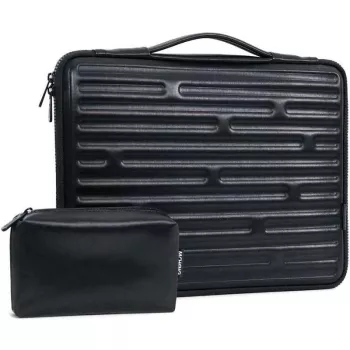
Waterproof Laptop Sleeve Case with Accessory Pouch for MacBook Air/Pro
A laptop sleeve should do more than look tidy—it should keep your MacBook protected when life gets messy: coffee splashes, rainy walks to the car, crowded backpacks, and quick airport moves. Our team designed this waterproof laptop sleeve case with a matching accessory pouch for simple, everyday protection and organized carry, without adding bulk to your routine.
What this sleeve set is made to handle
Daily use is full of small hazards that add up over time. This two-piece set focuses on the issues most people run into, especially when your MacBook moves between home, work, school, and travel.
- Everyday moisture protection: A waterproof outer layer helps guard against light rain, spills, and damp surfaces while commuting or traveling.
- Scratch-and-scuff control: A dedicated sleeve keeps your MacBook from rubbing against keys, chargers, or hard edges inside a tote or backpack.
- Streamlined carry: A slim profile is easier to slide in and out of a larger bag than a rigid case, especially in tight spaces like lecture halls or airplanes.
- Two-piece organization: The included accessory pouch separates cables and small gear from the laptop compartment so the sleeve stays clean and the MacBook stays protected.
Protection where it matters: water resistance + daily cushioning
For most people, protection means “reduce the risk from everyday accidents,” not “turn a laptop into a tank.” A sleeve works best when it pairs quick moisture defense with practical cushioning for normal bumps.
- Waterproof exterior layer: Designed to shed moisture and help reduce the risk of a quick spill becoming a bigger issue.
- Everyday impact buffering: Helps cushion common knocks (desk corners, packed-bag pressure, overhead-bin jostles) without turning into a bulky block.
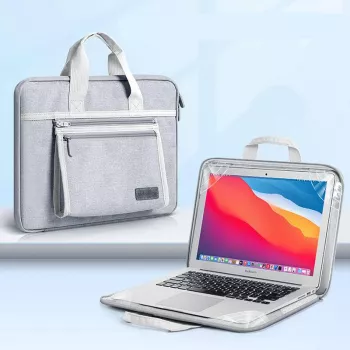
- Zip-and-go convenience: A zip closure helps keep the laptop fully covered when moving between locations and prevents accidental slide-outs.
- Cleaner storage in shared spaces: Useful at coworking desks, cafés, and libraries where surfaces can be damp, dusty, or constantly changing.
| Situation | What can go wrong | How the sleeve + pouch helps |
|---|---|---|
| Commute days | Light rain, crowded bags, quick packing | Waterproof outer layer + dedicated laptop compartment keeps your MacBook separated and covered |
| Coffee shop work sessions | Condensation on tables, accidental splashes | Moisture-shedding exterior and a zip closure reduce exposure time |
| School and campus | Backpack friction, desk-to-class transitions | Helps reduce scuffs and keeps charging gear in the pouch instead of the laptop compartment |
| Travel and airports | Tight bag checks, overhead-bin shuffles | Slim carry, quick removal at checkpoints, pouch keeps small items together |
Accessory pouch: the small upgrade that keeps bags from turning into a tangle
If you’ve ever dug through a backpack for a dongle or untangled a cable knot at the worst possible moment, you already know why the pouch matters. Separating hard accessories from your laptop also reduces avoidable wear.
- Cable control: Store charging cables, adapters, and small dongles in one place instead of loose in a backpack pocket.
- Cleaner laptop compartment: Keeping chargers and metal accessories out of the sleeve helps prevent scratches and pressure marks.
- Fast grab-and-go: Move the pouch between bags quickly when switching from a work bag to a weekend tote.
- Flexible use beyond tech: Works for earbuds, stylus pens, notecards, travel documents, or small personal items.
Getting the right fit for MacBook Air and MacBook Pro
Fit is where laptop sleeves either feel effortless or become annoying. Since MacBook Air and MacBook Pro sizes vary by generation, a smart fit check prevents zipper strain and shifting inside the sleeve.
Quick fit checklist before checkout
- Your exact MacBook model: Confirm screen size and the year/model identifier. Apple’s guide can help: Apple Support: Identify your MacBook model.
- Installed add-ons: Measure with any hard case installed if you plan to keep it on.
- Zipper clearance: Make sure the fit closes smoothly without strain.
- Carry style: If it rides in a packed backpack, avoid an overly snug fit that compresses the laptop at the edges.
Simple setups for work, school, and travel
Care tips to keep a waterproof sleeve performing well
For general device cleaning best practices, Apple’s recommendations are a solid baseline: Apple Support: How to clean your Apple products.
In-stock picks from our team
- Waterproof Laptop Sleeve Case with Accessory Pouch for MacBook Air/Pro — a simple, slim way to protect and organize your MacBook carry.
- 4-Pack Hydrogel Film Screen Protectors for Apple AirTag – Full Coverage TPU — helps keep the tracker you rely on looking clean and readable.
- Apple Watch Nylon Trail Loop Strap — an easy swap when you want a lighter, more breathable feel for long days.
- Punk Apple Watch Strap with Natural Stones & Beaded Boho Design — a more expressive option when you want your daily wear to stand out.
FAQ
Will this waterproof sleeve protect a MacBook from heavy rain?
The waterproof exterior helps with light rain and quick spills during everyday carry, but it isn’t meant for prolonged exposure or submersion. If it gets wet, dry the sleeve fully before putting your MacBook back inside.
What should go in the accessory pouch instead of the laptop sleeve?
Use the pouch for chargers, cables, adapters, dongles, and earbuds. Keeping hard or metal items out of the laptop compartment helps reduce scratches and pressure marks on your MacBook.
How do I choose the right size for my MacBook Air or MacBook Pro?
Confirm your exact model and screen size, then measure your MacBook’s dimensions—especially thickness if you use a hard shell case. You want a fit that slides in smoothly and zips closed without strain, with minimal extra space inside.









Leave a comment